> ## Documentation Index
> Fetch the complete documentation index at: https://bruno-a6972042-tutor-mock-server.mintlify.site/llms.txt
> Use this file to discover all available pages before exploring further.
# Adding and managing certificates
export const BrunoButton = ({collectionUrl, width = 160, height = 40, className = '', style = {}}) => {
const encodedUrl = encodeURIComponent(collectionUrl);
const buttonUrl = `https://fetch.usebruno.com?url=${encodedUrl}`;
return ;
};
Bruno supports custom Certificate Authority (CA) certificates and client certificates (mTLS) for APIs that require them. Client certificates work with **HTTPS**, **gRPC**, and **WebSocket** requests.
Global client certificates and per-certificate enable/disable are available in Bruno **v4.1.0+**.
## Try it out
Explore the [client-cert-badssl](https://github.com/bruno-collections/client-cert-badssl) sample collection to practice custom CA trust and client certificates against [badssl.com](https://badssl.com):
## Custom CA certificate
1. Open **Preferences** → **General**.
2. Enable **Use Custom CA Certificate**.
3. Upload your CA file (for example a `.pem`).
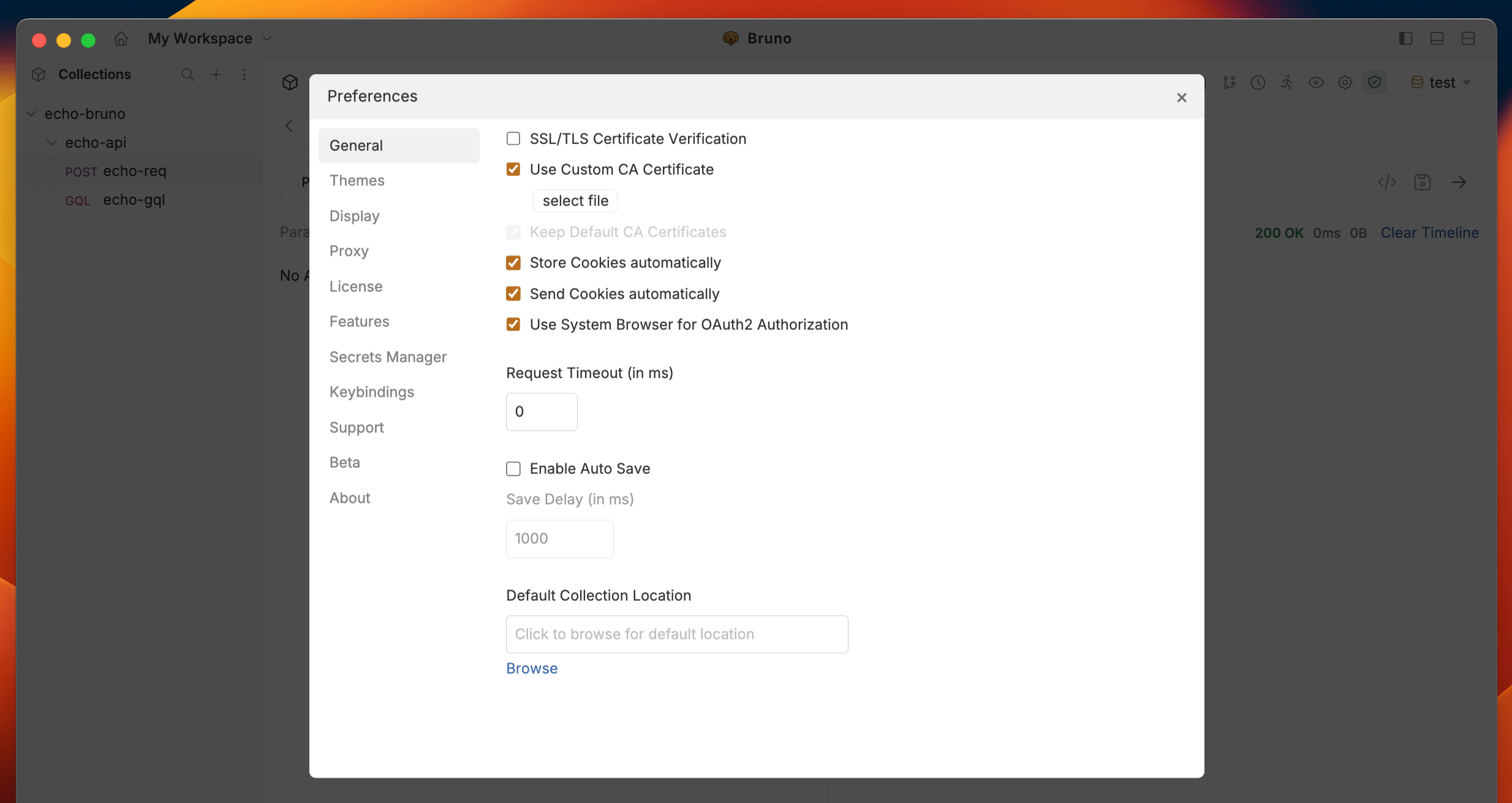 Disabling SSL/TLS verification can unblock a failing request quickly, but it hides real trust problems and is not recommended for production or shared collections. Prefer adding a custom CA instead.
## Client certificates
Bruno resolves client certificates from two places:
| Level | Where you configure it | Path style | Scope |
| -------------- | ----------------------------------------- | -------------------------------- | ----------------------------- |
| **Global** | Preferences → Client Certificates | Absolute file paths | Shared across all collections |
| **Collection** | Collection Settings → Client Certificates | Paths relative to the collection | That collection only |
Global certificates are inherited by default. You configure them once and reuse them across many collections. Collection certificates still work the same way as before for collection specific overrides.
### Resolution and precedence
When Bruno sends a request, it matches certificates by **domain** using first-match behavior across HTTPS, gRPC, and WebSocket.
Rules:
1. Only **enabled** certificates are considered.
2. **Disabled** certificates are skipped entirely (configuration is preserved).
3. For the same domain, an **enabled collection certificate** takes precedence over an **enabled global certificate**.
4. Certificates supplied to the CLI via `--client-cert-config` are appended after collection certificates and use the same first-match-by-domain behavior, so collection certificates still win for matching domains.
### Enable or disable a certificate
Every global and collection certificate has its own enable/disable switch and is **enabled by default**.
Disable a certificate when you want to:
* Temporarily swap certificates
* Debug a certificate configuration
* Test a request with a specific certificate turned off
* Preserve the configuration for later without deleting it
Disabling a certificate excludes it from resolution. It does not delete the entry.
### Add a global client certificate
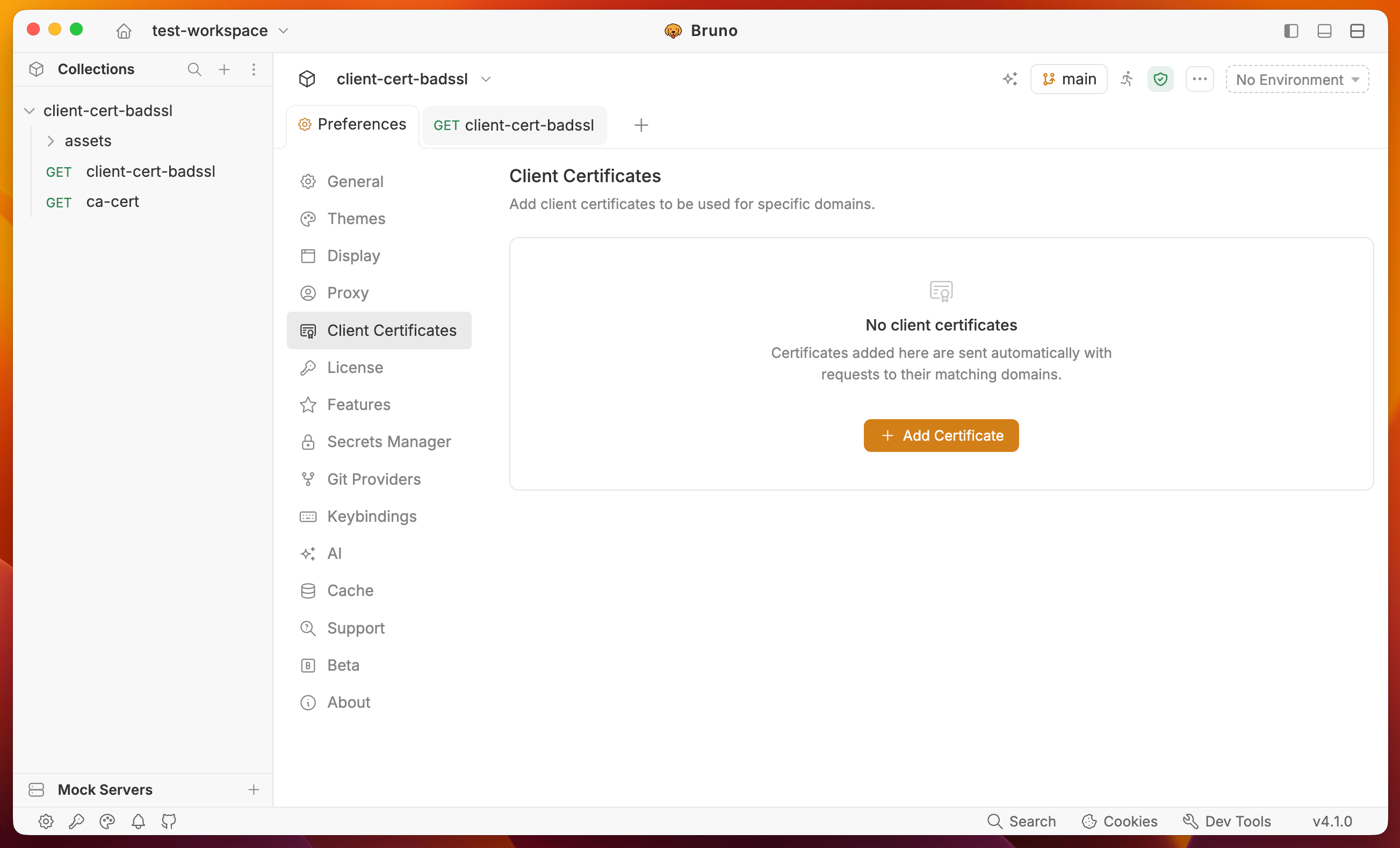
1. Open **Preferences** → **Client Certificates**.
2. Click **+ Add Certificate**.
3. Enter the **Domain** (for example `client.badssl.com` or `*.internal.example.com`).
4. Choose the type (**Cert & Key** or **PFX**).
5. Select the certificate file(s)
6. Enter a passphrase if required.
7. Save. The certificate is enabled by default and available to all collections.
Disabling SSL/TLS verification can unblock a failing request quickly, but it hides real trust problems and is not recommended for production or shared collections. Prefer adding a custom CA instead.
## Client certificates
Bruno resolves client certificates from two places:
| Level | Where you configure it | Path style | Scope |
| -------------- | ----------------------------------------- | -------------------------------- | ----------------------------- |
| **Global** | Preferences → Client Certificates | Absolute file paths | Shared across all collections |
| **Collection** | Collection Settings → Client Certificates | Paths relative to the collection | That collection only |
Global certificates are inherited by default. You configure them once and reuse them across many collections. Collection certificates still work the same way as before for collection specific overrides.
### Resolution and precedence
When Bruno sends a request, it matches certificates by **domain** using first-match behavior across HTTPS, gRPC, and WebSocket.
Rules:
1. Only **enabled** certificates are considered.
2. **Disabled** certificates are skipped entirely (configuration is preserved).
3. For the same domain, an **enabled collection certificate** takes precedence over an **enabled global certificate**.
4. Certificates supplied to the CLI via `--client-cert-config` are appended after collection certificates and use the same first-match-by-domain behavior, so collection certificates still win for matching domains.
### Enable or disable a certificate
Every global and collection certificate has its own enable/disable switch and is **enabled by default**.
Disable a certificate when you want to:
* Temporarily swap certificates
* Debug a certificate configuration
* Test a request with a specific certificate turned off
* Preserve the configuration for later without deleting it
Disabling a certificate excludes it from resolution. It does not delete the entry.
### Add a global client certificate
1. Open **Preferences** → **Client Certificates**.
2. Click **+ Add Certificate**.
3. Enter the **Domain** (for example `client.badssl.com` or `*.internal.example.com`).
4. Choose the type (**Cert & Key** or **PFX**).
5. Select the certificate file(s)
6. Enter a passphrase if required.
7. Save. The certificate is enabled by default and available to all collections.
 ### Add a collection client certificate
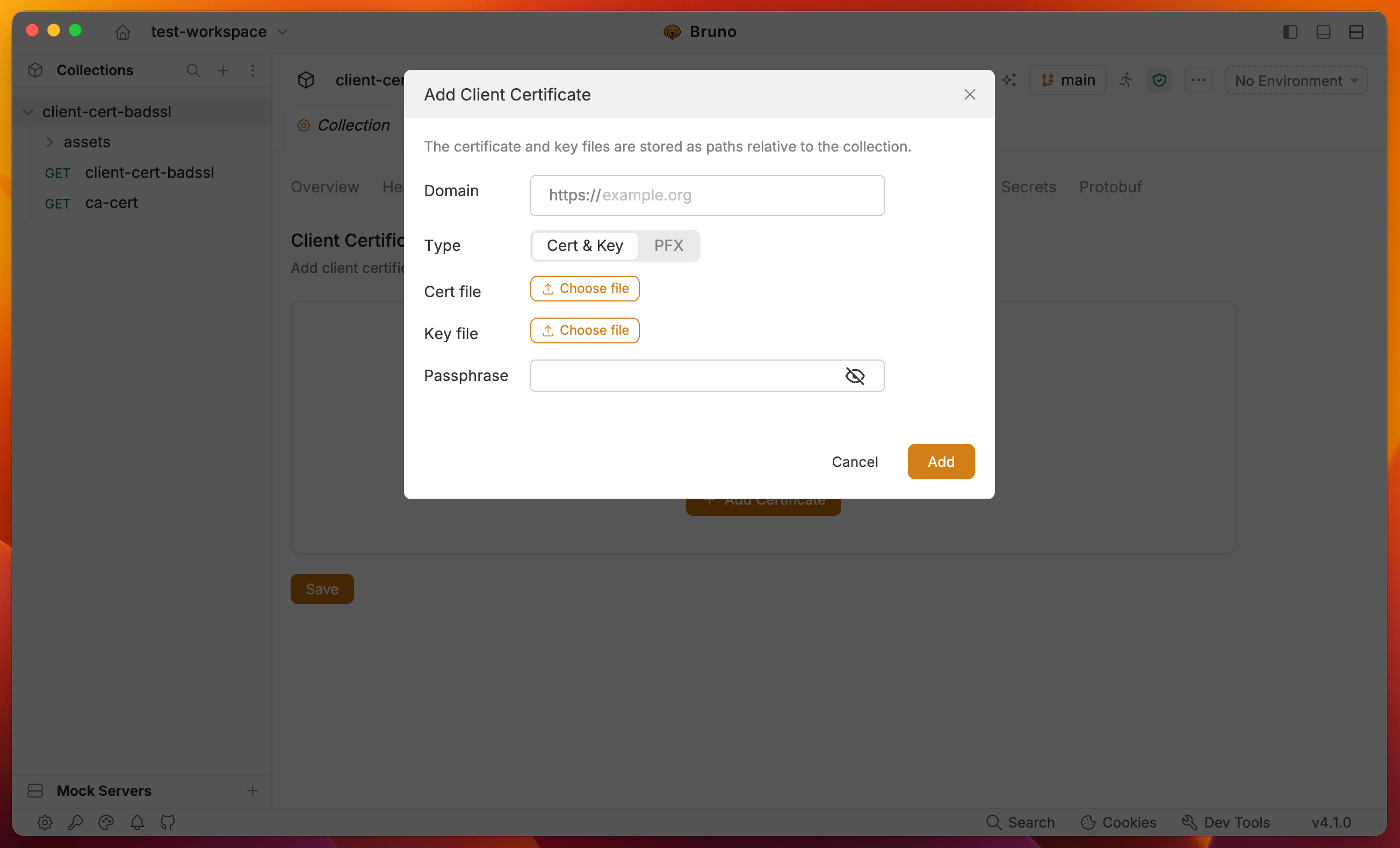
1. Open the collection → **Collection Settings** → **Client Certificates**.
2. Click **+ Add Certificate**.
3. Enter the **Domain**.
4. Choose **Cert & Key** or **PFX**.
5. Select the certificate file(s). Paths are stored **relative to the collection**.
6. Enter a passphrase if required (supports `{{variable}}` interpolation).
7. Save, then send a request to a matching host.
### Add a collection client certificate
1. Open the collection → **Collection Settings** → **Client Certificates**.
2. Click **+ Add Certificate**.
3. Enter the **Domain**.
4. Choose **Cert & Key** or **PFX**.
5. Select the certificate file(s). Paths are stored **relative to the collection**.
6. Enter a passphrase if required (supports `{{variable}}` interpolation).
7. Save, then send a request to a matching host.
 ## Using client certificates with Bruno CLI
The CLI does **not** read the global Preferences store. In CI, pass certificates with the existing `--client-cert-config` flag (same shape as before v4.1.0).
```bash theme={null}
bru run --client-cert-config /path/to/client-cert-config.json
```
Example config file:
```json theme={null}
{
"enabled": true,
"certs": [
{
"domain": "*.internal.example.com",
"type": "cert",
"certFilePath": "/abs/path/global-client.crt",
"keyFilePath": "/abs/path/global-client.key",
"passphrase": ""
}
]
}
```
Behavior in the CLI:
* Collection certificates from the collection file are loaded and honor the per-certificate `disabled` field.
* Certificates from `--client-cert-config` are appended after collection certificates.
* Matching uses the same first-match-by-domain rules, so collection certificates take precedence for overlapping domains.
See [Proxy & mTLS](/bru-cli/proxyConfiguration) for more CLI examples.
## Using client certificates with Bruno CLI
The CLI does **not** read the global Preferences store. In CI, pass certificates with the existing `--client-cert-config` flag (same shape as before v4.1.0).
```bash theme={null}
bru run --client-cert-config /path/to/client-cert-config.json
```
Example config file:
```json theme={null}
{
"enabled": true,
"certs": [
{
"domain": "*.internal.example.com",
"type": "cert",
"certFilePath": "/abs/path/global-client.crt",
"keyFilePath": "/abs/path/global-client.key",
"passphrase": ""
}
]
}
```
Behavior in the CLI:
* Collection certificates from the collection file are loaded and honor the per-certificate `disabled` field.
* Certificates from `--client-cert-config` are appended after collection certificates.
* Matching uses the same first-match-by-domain rules, so collection certificates take precedence for overlapping domains.
See [Proxy & mTLS](/bru-cli/proxyConfiguration) for more CLI examples.